Help
How the How Many of Us addon and app work, and answers to the usual questions.
Getting started
- 1
Install
Get the free app for Mac or Windows from the download page. It installs the addon and keeps it up to date. Or install the addon on its own, from CurseForge, Wago or WoWInterface.
- 2
Play
Log in and play as usual. The addon counts the players around you and works out your layer. There's nothing to set up.
- 3
Send
The app sends your reports when you log out or
/reload. No app? Type/hmou sendand paste the code into your browser.
The panel
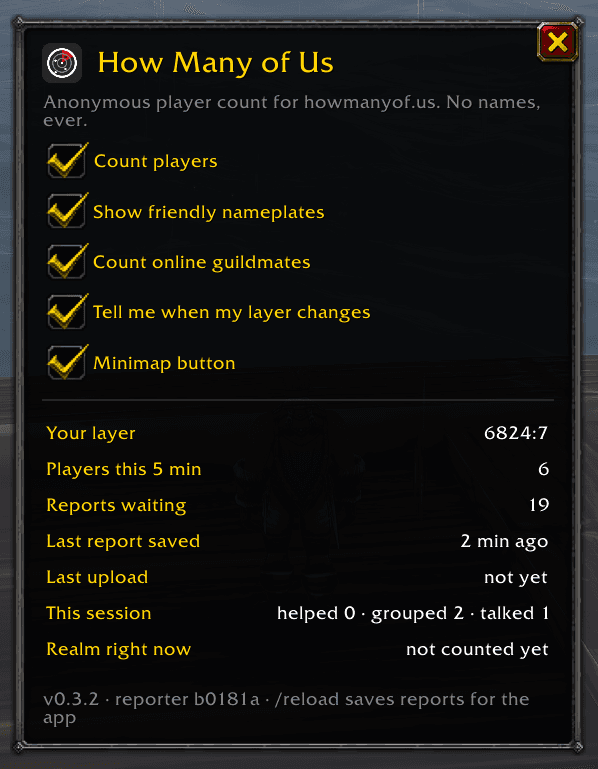
Type /hmou or click the minimap button. The switches at the top turn counting, friendly nameplates, guildmates, layer messages, the minimap button and send reminders on or off. Below them:
- Your layer
- The layer you're on, worked out from nearby NPCs. When it's been a while since one was in view, it shows the last layer and how long ago that was.
- Players this 5 min
- Different players the addon has noticed in the current five-minute window.
- Reports waiting
- Reports saved and not sent yet. One is saved every five minutes you play.
- Last report saved
- When the addon last finished a report.
- Last upload
- When the app last sent your reports. The app can only tell the addon while WoW is closed, so this catches up the next time you start the game.
- This session
- How many players you've helped, grouped with and talked to since you logged in. Only for you: it never leaves your computer.
- Realm right now
- The census's estimate for your realm and how many layers it has. The app brings it into the game while WoW is closed.
Commands
/hmou- Open or close the panel.
/hmou status- Print the version, your layer and what's waiting in chat.
/hmou send- Send your reports without the app: copy a link and a code into your browser.
/hmou send force- The same, and wraps up the last few minutes into a report first, so there's always something to send.
/hmou plates- Turn friendly player nameplates on or off.
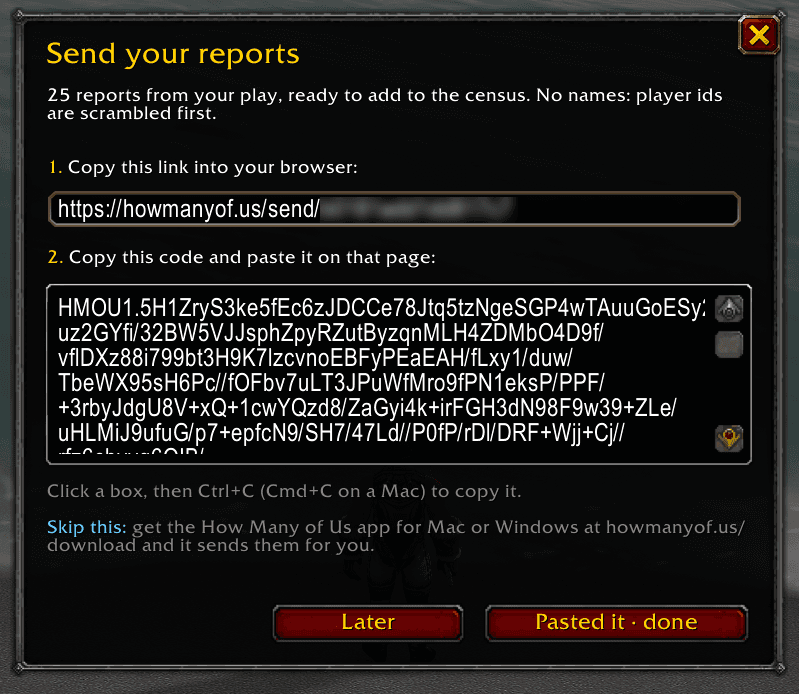
/hmou send: copy the link into your browser, then the code onto that page.Questions
Why does it say “finding…” instead of a layer?
The layer comes from NPCs, so the addon needs one in view: a nameplate, your target, your pet or a vendor. Walk past any NPC and it shows up within a few seconds. Cities and busy zones are quickest.
Should I turn on friendly nameplates?
If you don't mind them, yes. Nameplates are how the addon sees the players around you, so more plates means a better count. Use the switch in the panel, /hmou plates or the game's Shift+V.
Does it count in dungeons and battlegrounds?
Only your own group. Instances aren't part of a realm's layers, so the addon pauses the location and layer while you're in one.
My reports aren't sending.
With the app: check it's running (look for the scope in the menu bar or tray), then log out or /reload to save the reports for it. Without it: type /hmou send. WoW keeps reports for about two weeks; older ones can't count.
The send page says my reports were already counted.
That's fine. Every report has its own id and counts once, however many times it's sent, so pasting the same code twice, or pasting and also using the app, never counts you double.
Why did the send window open by itself?
If reports sit unsent for a couple of days, the addon offers to send them by hand. It never asks while the app is sending them. Turn it off with “Remind me to send reports” in the panel.
A new feature isn't showing after an update.
When an update adds new files, WoW only loads them when it starts. Quit the game fully and start it again; /reload isn't enough.
How do I get on the leaderboard?
Reporting is anonymous until you choose otherwise. Sign in, then open “See Your Contribution” from the app, or the page that opens after sending by hand, and choose Join. You pick the name that shows, never your character's. See the leaderboard.
What does it send about me?
No character names, ever. Player ids are scrambled on your computer before anything leaves it, and your position is rounded to a grid square of the zone. The privacy policy lists everything.
How do I pause or stop it?
Untick “Count players” in the panel to pause. To stop for good, disable or remove the addon, and quit the app or turn off sending in its settings.
Still stuck? Get in touch.